
Description
Product Overview
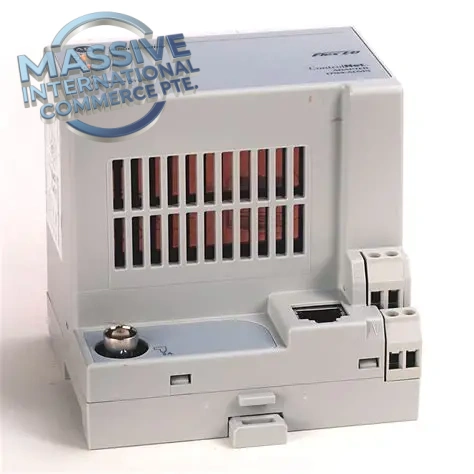
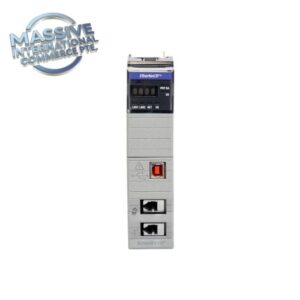
The Allen-Bradley 1794-ACN15 is a ControlNet communications adapter module for the Rockwell Automation Flex I/O distributed I/O system. It connects a Flex I/O terminal base assembly to the ControlNet industrial network, enabling high-speed, deterministic communication between the Flex I/O bank and ControlNet controllers. This adapter manages data exchange for digital and analog I/O modules mounted on Flex I/O bases, supports redundant ControlNet media, and provides fault reporting for I/O and network diagnostics. Widely applied in automotive, chemical, power, water treatment and manufacturing process control systems for distributed field I/O deployment.
Technical Specifications
| Item | Parameter |
|---|---|
| Part Number | 1794-ACN15 |
| Manufacturer | Allen‑Bradley (Rockwell Automation) |
| Series | Flex I/O, ControlNet |
| Product Type | ControlNet Adapter Module |
| Network Interface | ControlNet, 5 Mbps baud rate |
| Media Support | Coaxial, redundant BNC ControlNet connection |
| Maximum Flex I/O Size | Supports up to 8 Flex I/O modules on one local Flex backplane |
| Backplane Current Draw | 650 mA @ 5 VDC Flex bus |
| Power Supply | 24 VDC nominal, range 19.2–31.2 VDC |
| Isolation | 500 VAC isolation between ControlNet network and I/O backplane |
| Diagnostics | LED status indicators for power, network, comms, fault |
| Enclosure Rating | IP20 (panel mount inside control cabinet) |
| Operating Temp | 0°C ~ +60°C |
| Storage Temp | -40°C ~ +85°C |
| Humidity | 5–95% non-condensing |
| Configuration Software | RSNetWorx for ControlNet, Studio5000 / RSLogix 5000 |
| Hot Swap | Yes |
Key Features
- ControlNet 5Mbps deterministic real-time communication adapter for Flex I/O racks, delivers scheduled I/O data with high repeatability for process control applications.
- Supports redundant ControlNet coaxial media to eliminate single cable point of failure, improving network reliability for critical production lines.
- Accommodates up to 8 Flex I/O modules on the local Flex backplane; mixes analog, digital, specialty I/O types in the same Flex station.
- Comprehensive diagnostic LEDs for module health, network link status, communication faults and I/O rack failures for fast on-site troubleshooting.
- Galvanic isolation between ControlNet network side and Flex I/O backplane, protecting controller and I/O electronics from transient noise and ground potential differences.
- Hot-swappable module design, can be replaced online while the rest of the ControlNet network remains operational, subject to approved maintenance procedures.
- Works seamlessly with Logix family controllers (ControlLogix) over ControlNet; configured via RSNetWorx for ControlNet network scheduling.
- Compact Flex I/O form factor, mounts on standard Flex terminal base, ideal for distributed field I/O installations saving cabinet space.
Installation Notes
- Mount 1794-ACN15 onto a Flex I/O terminal base, install remaining Flex I/O modules sequentially on the Flex backplane.
- Terminate ControlNet trunk cable with proper 75Ω terminators at both physical ends of the ControlNet coaxial network.
- Separate ControlNet coaxial signal wiring from high-power AC cables to reduce EMI and prevent network noise issues.
- Verify 24VDC supply voltage and polarity before energizing the Flex station.
- Follow lockout/tagout procedures before removing or inserting the adapter module.
- Save ControlNet network schedule and Logix program project backup before module replacement.
- After installation, verify network scheduling, I/O tag mapping and perform full I/O loop test before returning the control system online.
Testing Procedure
- Visual inspection: Check module housing, front LED indicators, edge connector and BNC network ports for damage, corrosion or bent pins.
- Install adapter on Flex base and attach all required Flex I/O modules, connect 24VDC field power and ControlNet coaxial cable.
- Apply power and observe power, network and status LEDs to confirm successful power-up self-test.
- Use RSNetWorx to scan the ControlNet network and confirm the 1794-ACN15 adapter is detected.
- Verify scheduled I/O communication, toggle digital I/O and check analog readings in Logix controller tags.
- Simulate network cable faults and I/O module faults to validate diagnostic fault reporting and alarm behavior.
- Save network schedule and project backup, record test results and tag spare module for inventory.
FAQ
Q: What is Allen-Bradley 1794-ACN15 used for? A: It is a ControlNet adapter for Flex I/O racks, connecting distributed Flex I/O modules to ControlNet network for real-time data exchange with ControlLogix PLC controllers.
Q: How many Flex I/O modules can one 1794-ACN15 support? A: Maximum of 8 Flex I/O modules per Flex station.
Q: Is 1794-ACN15 hot swappable? A: Yes, hot swap is supported under approved maintenance procedures.
Q: What software is used to configure the ControlNet network for this adapter? A: RSNetWorx for ControlNet for network scheduling; RSLogix5000 / Studio5000 for controller I/O tag configuration.

 Start Chat


 Send an Email


